


Location Mate - Share & Track
3.6209.00 Reviews
App Specs
- Version
- 1.0.52
- Updated On
- License
- Free
- Downloads
- 1,000,000+
- Developer
- IMPACTSOLTER
- Categories
- Maps & Navigation
- Platform
- Android
Screenshots
 Analysis by AppCompare
When several people are trying to meet up or get home at different times, a string of “Where are you?” messages can become its own little chore. I find a location-sharing app most useful when everyone has agreed on the plan and wants a simple way to coordinate, rather than another tool that quietly takes over the day. Location Mate - Share & Track is aimed at that practical kind of coordination, with location sharing, route planning and custom alert zones among its advertised uses.
A shared-use routine that stays practical
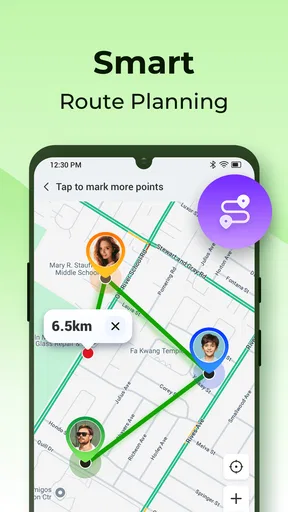
Picture a household heading to the same neighborhood from different places: one person is picking up groceries, another is bringing a child home, and someone else is already waiting at the destination. A shared location can reduce the need for repeated check-ins, while a planned route gives the group a common point of reference. The benefit is not that everyone needs to watch a map constantly; it is that the people involved can check when it genuinely helps.
That distinction matters. I would treat location sharing as a tool for a specific outing or routine, not as a substitute for asking someone directly when plans change. Before relying on it, agree on who is sharing, who needs to see the location, and when the sharing should stop. That small conversation makes the feature feel helpful instead of intrusive.
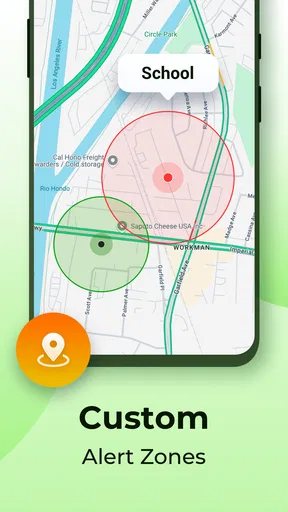
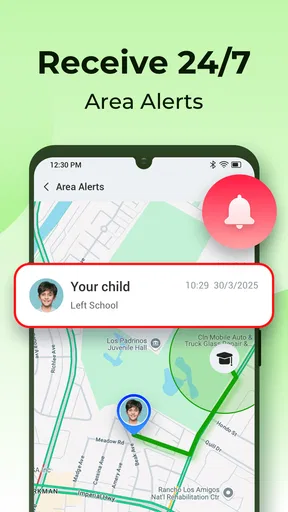
Custom alert zones could also suit predictable places, such as a meeting point or a regular destination, where a notification may be more useful than repeatedly opening the map. I would keep any zones focused and limited: too many alerts can create noise, and a notification is only useful if the group understands what it means and what action, if any, to take.
Set boundaries before sharing
Location tools work best when each person understands the arrangement and has a say in it. For shared devices, be especially careful about whose account is active and who can see its location. A phone used by more than one person can make a map look like it represents the person carrying it when it may only represent the device. That is an easy source of confusion during a pickup or meetup.
I would check the sharing choices together before heading out, then confirm that the intended people can see what they need. If someone is borrowing a device, do not assume the usual sharing setup still reflects the person using it. Treat the app as a coordination aid, not proof of someone’s whereabouts or a way to monitor a person without their knowledge.
Location Mate is free to install, with optional in-app purchases priced from $2.99 to $12.99 per item. That makes it sensible to try the basic experience before paying for anything. I would first work out whether the people you coordinate with are comfortable using it and whether its route and alert-zone tools fit your routine. An optional purchase is not worthwhile just because a feature sounds useful in theory; it should solve a recurring problem for your group.
Worth Reading Before You Choose

EA SPORTS FC Mobile 26 Is a Bigger Football Game, but It Takes Time

Flipboard Shows What News Apps Must Do Beyond the Feed

Switching to Android Auto Means Rethinking Your Driving Routine

Google Calendar Makes a Crowded Week Easier to Manage

Ludo King Makes the Most of the Minutes Between Plans

Baby Panda World Brings Quick Play to Modern Phones, but Its Game Library Feels Busy
Where it fits among navigation choices
For turn-by-turn driving directions, a dedicated navigation app is usually the better first choice. Its main job is to guide a driver through a route, while Location Mate’s appeal is the shared coordination around people, places and alerts. If your only need is to get from one address to another, adding a separate location-sharing routine may be unnecessary.
At the other end, a quick message with a meeting address is often enough for a one-off plan. It takes little setup and does not ask a group to maintain a shared location view. Location Mate makes more sense when several people need to coordinate over the course of an outing, when plans involve more than one stop, or when a location alert could prevent needless check-ins. The trade-off is that everyone must be comfortable with the sharing arrangement and remember to use it deliberately.
A useful habit is to plan the route before the group separates, then use live location as a fallback for timing or finding one another. That avoids turning the map into a running conversation and leaves direct messages available for changes that a location dot cannot explain, such as a delayed bus or a changed pickup point.
For a household that already coordinates by phone, the app can make a shared plan easier to follow. It is less compelling for people who rarely meet in groups, prefer not to share location, or only need navigation. In those cases, a regular map app or a simple message may be quicker and more comfortable.
Have you ever been in a situation where you needed to share your location with friends or family, but the process seemed like a hassle? Well, I’ve got some good news for you. I recently tried out an app called Location Mate - Share & Track, and let me tell you, it’s a game-changer.
Getting Started with Location Mate
First things first, downloading Location Mate was a breeze. It’s available on both Android and iOS, so you’re covered no matter what device you’re using. Once you install the app, the user-friendly interface is immediately welcoming. You know when you open an app and everything just makes sense? That’s exactly how it felt. No complicated menus or hidden features, just straightforward navigation.
Features that Stand Out
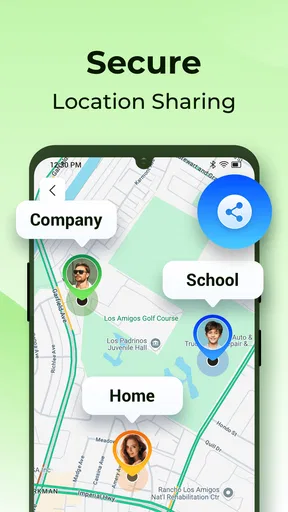
One of the main features of the app is its real-time location sharing. Whether you’re meeting someone in a crowded area or just want to let your loved ones know where you are, this feature is incredibly handy. Simply select the contacts you want to share your location with, and boom, they can see where you are in real-time.
Another feature I found super useful is the tracking option. If you’re planning a road trip or an adventure with friends, you can easily track each other’s locations. This is especially useful for group activities where staying connected is key.
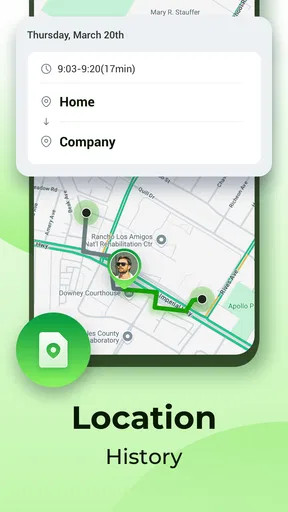
For those of us who are a bit forgetful, the app also offers location history. This means you can look back and see where you’ve been, which is perfect for tracking your travels or just for reminiscing about past adventures.
Privacy and Security
Now, I know what you’re thinking. With all this location sharing, what about privacy? The developers have clearly put a lot of thought into this. You have full control over who sees your location and for how long. The app doesn’t share your location with anyone without your permission, and you can easily revoke access at any time.
On top of that, all data is encrypted, ensuring that your information is safe from prying eyes. It’s always reassuring to know that an app takes privacy seriously, especially when it’s dealing with something as personal as your location.
Why Location Mate Stands Out
Let’s face it, there are plenty of apps out there that offer location sharing, but what makes Location Mate stand out is its simplicity and reliability. I’ve tried other apps before, and often they’re either too complicated or just don’t work properly. With Location Mate, I never encountered any glitches or unnecessary complexities.
Plus, the app uses minimal battery, which is a huge plus. We all know how frustrating it can be when an app drains your battery life, especially when you need it the most. Location Mate operates smoothly in the background without consuming too much power.
Perfect for Everyday Use
Whether you’re a parent wanting to keep an eye on your kids, or someone who travels frequently and wants to keep family updated, this app fits seamlessly into everyday life. I found myself using it more often than I expected, simply because it’s so convenient.
Another little perk is the app’s integration with other services. You can easily share your location through different messaging platforms, making it versatile and adaptable to your communication preferences.
Choosing it for a household
Location Mate is developed by IMPACTSOLTER and sits in the maps and navigation category. Its audience is broad: the age rating is Everyone, and it has passed one million installs, with an average rating of 4.2 from around 2.5 thousand ratings. Those figures suggest that many people have tried it, but I would still judge it by whether its sharing setup suits the people in your household rather than treating popularity as a guarantee.
The current version is 1.0.30, and the app requires Android 7.0 or later. If you are setting it up for a group, the practical question is not just whether each phone can install it; it is whether each person is willing to participate and keep the arrangement clear. A location-sharing tool only helps when the people involved understand its purpose and can speak up if that purpose changes.
For parents and caregivers, the age rating is not a substitute for a family conversation. Explain when location sharing is being used and why, and make sure a young person knows how to ask for a change to the arrangement. For adults sharing a device or account, be just as explicit: agree whose location the phone represents, and avoid assuming that a visible device marker proves who is carrying it.
Trust, expectations and everyday coordination
A sensible first use is a single shared outing. Choose a clear destination, decide who actually needs to share, and use the map to help with arrival timing. Afterward, check whether it reduced confusion or simply added another screen to manage. That quick review helps a household decide whether to make the app part of a recurring routine or keep it for occasional plans.
Route planning can help when the group is splitting up or making stops, but it does not replace judgment about travel conditions or changes made along the way. If someone takes a different route or arrives later than expected, a direct message is still the clearest way to explain why. Location data can show a position; it cannot tell the rest of the group what has happened.
One question people often have is whether they need to share continuously. I would avoid making that the default assumption. Set up sharing for the coordination need at hand, and use the available controls to keep the audience and duration appropriate. Another likely question is whether an alert zone should be created for every regular place. I would start with only the locations that genuinely help the group make a decision; otherwise, alerts risk becoming background noise.
If privacy is the deciding concern, take time to review who can see a location and discuss the limits with everyone involved before using the app. If a group cannot agree on those boundaries, a one-time message or a meeting point may be the better choice. The most useful setup is not the one that shares the most, but the one everyone understands and accepts.
Final Thoughts
To wrap it up, Location Mate is an app I’d highly recommend to anyone looking for a reliable location-sharing tool. It’s intuitive, secure, and incredibly practical. Whether you’re tech-savvy or not, this app makes location sharing easy for everyone.
So, if you’re in the market for a dependable app to share and track locations, give Location Mate a try. You might just find it becomes your go-to tool for staying connected with friends and family.
My household verdict
I see Location Mate as a useful option for people who regularly coordinate pickups, shared outings or multi-stop plans and want location context alongside route planning. Its appeal is strongest when everyone opts in, the purpose is specific, and the group keeps communication open. For occasional meetups, a message may be enough; for navigation-first needs, a dedicated map tool is likely more direct.
I would start with a modest, agreed-upon use rather than turning on every possible form of sharing at once. If the app helps your household spend less time checking in without making anyone feel watched, it has earned a place in the routine. If it creates uncertainty about accounts, devices or boundaries, step back and choose a simpler way to coordinate.
Pros
- User-friendly interface for easy navigation.
- Real-time location sharing is accurate.
- Battery optimization minimizes drain.
- Customizable alerts for specific locations.
- Cross-platform compatibility is seamless.
Cons
- Requires constant internet connection.
- Limited offline map functionalities.
- Data privacy concerns for sensitive info.
- Occasional lag in location updates.
- Some features locked behind paywall.
FAQs for Location Mate - Share & Track
What is Location Mate - Share & Track used for?
Location Mate - Share & Track is designed to help users share their real-time location with friends and family. This app allows you to track the whereabouts of your loved ones, ensuring their safety and providing peace of mind. It's particularly useful for coordinating meet-ups or keeping track of children and elderly family members.
Is Location Mate - Share & Track safe to use?
Yes, Location Mate - Share & Track prioritizes user safety and privacy. The app uses secure encryption to protect your location data and offers customizable privacy settings. Users can choose who to share their location with and for how long, ensuring that your information is only accessible to trusted contacts.
Does Location Mate - Share & Track consume a lot of battery?
Location Mate - Share & Track is optimized to minimize battery usage. While any app that uses GPS can impact battery life, this app has been designed to be efficient. Users can manage battery consumption by adjusting location update intervals and using power-saving modes within the app’s settings.
Can I use Location Mate - Share & Track offline?
Location Mate - Share & Track requires an internet connection to update and share real-time location data. While some features, like viewing saved locations or setting up alerts, might be accessible offline, real-time tracking and sharing will not function without connectivity.
Is Location Mate - Share & Track compatible with both Android and iOS?
Yes, Location Mate - Share & Track is available on both Android and iOS platforms. The app offers a consistent user experience across both operating systems, ensuring seamless location sharing and tracking regardless of the device being used.


